Foxybingo Error Codes
Foxy Bingo error codes explained for UK players: what messages on login, deposit and withdrawal mean, a 60-second checklist and how to keep a fault log.
Page contents10
Current status of Foxy Bingo
Most Foxy Bingo faults come down to a card, a limit, verification or a game that will not load. Note the exact message and the time, run the 60-second checks below, then match the wording to the table. Updated 14 November 2026.
Before you change anything on your side, work out whether the problem is yours or the site's. If the lobby, the bingo rooms and the cashier all fail at the same moment, the cause is usually on the service side, and a few minutes of patience helps more than reinstalling the app. If only one game, one payment method or only your login fails, the cause is nearly always local: a card setting, a limit, a stale browser session or a verification step that is still open.
A quick reading of the lobby, bingo rooms, cashier and live games, with a running list of past faults kept underneath.
Read the status block first, then compare it with your own symptom. If everything looks normal there but your account still shows a message, jump to the table of messages further down. If a single section is struggling, try another section of the site and come back later. Either way, write down the time you first saw the problem, because every later step, from a support chat to a formal complaint, goes faster with an exact minute and a screenshot.
Diagnostics in 60 seconds
- 1
Record the message
Take a screenshot or copy the wording exactly, and note the time. A paraphrase from memory is hard for anyone to act on.
- 2
Reload once
Refresh the page, or close the app fully and open it again. Do this once only, so you do not repeat a payment or a stake by accident.
- 3
Test another section
Open the bingo lobby, then a slot, then the cashier. If only one of them fails, you have already narrowed the cause.
- 4
Switch connection
Move from Wi-Fi to mobile data, or the other way round. A weak or filtered network explains many pages that hang half-loaded.
- 5
Update and clear
Install the latest version of the Foxy Bingo app, or clear the browser cache and try a private window on the web.
- 6
Check your account
Look at your deposit limits, your verification status and how many payment methods you have used recently. Many cashier messages start here.
Those six steps take about a minute and settle most cases. The order matters: the first two cost nothing and cannot cause new problems, while the last two change the state of your device or account. If you reach step six and the cause is still unclear, the table of messages later on this page is the next stop.
What happens to your bet when something fails
A freeze in the middle of a bingo game or a slot spin is stressful because you cannot tell whether the stake was taken. The safe habit is simple: do not repeat the action straight away. Open your account history first and look for the round, the ticket or the transaction. Only when you are sure that nothing was recorded should you play or pay again.
- Do not tap the same button several times; one request is enough.
- Check your account history for the round, ticket or payment before you try again.
- For a deposit, look at your bank app as well as the cashier, since the two can update at different speeds.
- Keep the screenshot with the time visible, plus the game or room name.
- If the history and your balance disagree, contact support and quote the time and the amount.
Support is available 24 hours a day, 7 days a week. A message that includes the exact time, the amount and a screenshot is usually the quickest to resolve.
Your own fault log
A short personal log turns a vague complaint into a clear case. You do not need a spreadsheet; a note on your phone works. What counts is that each entry has the same few fields, so that you can spot patterns, such as a problem that appears only on mobile data or only at one time of day.
| Field | What to write |
|---|---|
| Date and time | To the minute |
| Where | Room, game, cashier |
| Device | Phone or browser |
| Message | Exact wording |
| Amount | Stake or payment |
| Action taken | Reload, support |
For the device, say whether you used the phone app, the mobile site or a desktop browser. Add the support reference if you receive one, and the time of the reply. If a dispute is not settled by Foxy Bingo itself, the independent adjudication service named in the terms is IBAS. You can approach it within 12 months, after you have received the final reply, and a tidy log is exactly what it asks for.
Fixes by symptom
Cannot log in
Reset the password, then try a private window. If you set a time-out or self-exclusion, access stays closed by design; self-exclusion lasts at least 6 months. See responsible gambling.
Deposit declined
Use a Visa, Mastercard or Maestro debit card; credit cards cannot be used for gambling in the UK. Check the amount against the £2,000 single-deposit cap and your own limits.
Withdrawal not moving
Payments must be cleared and verification finished. Money goes back only to a method you deposited with. Details are on the withdrawal page.
Game will not load
Try a title from another studio, then switch network. If only one game fails and others run fine, wait a little and retry later.
Bonus missing
Welcome offers need a qualifying deposit and spend, and the claim window is limited. Read the bonus rules and the wagering guide before you contact support.
Apple Pay not shown
On the web, Apple Pay is offered on iOS in Safari. In another browser the option may simply not appear, so open the site in Safari and try again.
Error messages and what they mean
Wording on screen can change between the app, the mobile site and the desktop site, so it is more reliable to match the topic of a message than a number. Find the closest line in the table, try the first step, and only then move on to support. Nearly all the cashier messages come from rules that protect your account, not from a fault.
Card refused
- Usual cause
- Not debit
- First step
- Use debit card
Deposit refused
- Usual cause
- Over cap
- First step
- Lower amount
Method not allowed
- Usual cause
- Fourth method
- First step
- Use earlier method
Own limit reached
- Usual cause
- Your limit
- First step
- Wait or review
Withdrawal blocked
- Usual cause
- Checks open
- First step
- Send documents
Payout method rejected
- Usual cause
- No deposit
- First step
- Deposit first
Stake too high
- Usual cause
- Slot cap
- First step
- Lower stake
Apple Pay missing
- Usual cause
- Wrong browser
- First step
- Use Safari
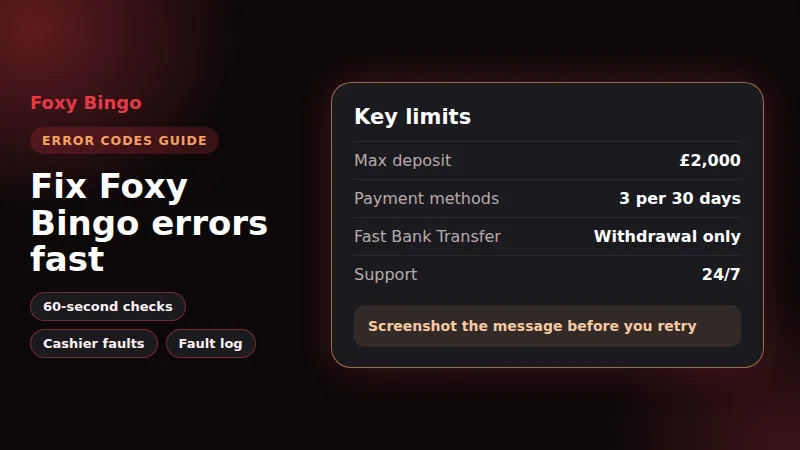
The cap on a single deposit is £2,000 and the stake limit on online slots is £5 for players aged 25 and over, or £2 for ages 18-24. These are rules, so a message about them is not a fault. Your own deposit limit works differently: lowering it takes effect at once, while raising it takes 24 hours.
Max single deposit
£2,000
Active payment methods
3 in any 30 days
Pay by Bank deposits
From £5
Fast Bank Transfer
Withdrawals only
Bank transfer payout
2-4 business days
Support
24/7
One rule catches many players out: you can use only three payment methods in any rolling 30 days, for example a debit card and an e-wallet. A fourth method is refused until the window moves on. Withdrawals also go back to a method you deposited with, and some methods, such as PayPal, paysafecard and Mastercard, need a successful deposit in the last six months.
Verification and source-of-funds checks
A withdrawal that stops without a clear reason is very often waiting on verification. Before the first payout you need to have confirmed your name, age and address. Later, the site may ask for more documents, such as a payslip, three months of bank statements or another proof of where the money came from.
- 1Open the message or email that asks for documents and read exactly what is requested.
- 2Send clear, complete photos or scans with all four corners visible.
- 3Send source-of-funds papers within 28 days; after that a monthly limit of £100 can apply.
- 4Wait for the confirmation before you request the withdrawal again.
Sending the right documents the first time is the biggest saving of time. If you are unsure which paper counts, ask support before uploading. For the wider picture of how the brand is run and licensed, see the legitimacy page.
Games that will not load
The Foxy Bingo lobby carries games from several studios, so one title failing does not mean that the whole site is down. A useful test is to open a game from a different studio. If that one runs normally, your connection and account are fine, and the first game probably has a temporary problem of its own.
- Evolution
- Pragmatic Play
- Playtech
- Eyecon
- Blueprint Gaming
- Games Global
Live shows and tables need a steady connection, so they are the first to stutter on weak mobile signal. If a live game drops, wait for it to return before you place the next bet, and check your history to see how the last round was recorded. The bingo rooms are described on the bingo page, and live game shows are covered in the game shows guide.
When to contact support
- The same message returns after the 60-second checks.
- Your balance and your history do not match.
- A deposit left your bank but never reached your account.
- A document upload keeps failing.
- You see a message you cannot match to anything above.
Send the details from your fault log in a single message: time, device, exact wording and amount. This saves a round of questions. If you ever feel that gambling is getting hard to control, tools such as deposit limits and GAMSTOP are available, and BeGambleAware and GamCare offer free help.
Foxy Bingo errors: common questions
What to do next
Read the terms that apply to you, set your limits first and keep your play for entertainment. When you feel ready to give it a go, , and stop if it stops being fun.
Written by Michael Roberts
Bonus & Promotions Expert · How we score Foxy Bingo
Published 14 November 2026 · Updated 14 November 2026 · Checked 14 November 2026